 Resume Generator
Free Resume Generator — No Sign-up Fees, No Watermark
Import your old resume or start fresh, pick one of fifteen ATS-friendly templates, and download a polished PDF or Word file in minutes.
How It Works
Import or fill in your details
Upload an existing PDF or Word resume to auto-populate your profile, or type in your work history, education, skills, and contact information from scratch.
Pick a template
Browse fifteen professionally designed templates spanning modern, classic, creative, and technical styles. Every template is optimized for applicant tracking systems.
Export your resume
Download your finished resume as a PDF or a Word document (.docx). No watermark, no paywall, no catch.
Professional Resume Templates
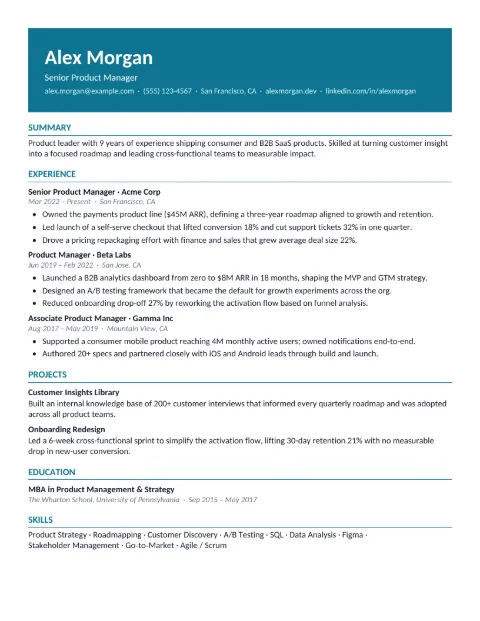
- Horizon (Modern) — Bold teal header band with name and contact in white, clean single-column body below. Modern and broadly appropriate.
- Cobalt (Modern) — Two-column layout with bold black section rules, blue accents, icon-led contact details, and skills set as tags.
- Meridian (Professional) — Light two-column layout with fine grey section rules, blue accents, achievement badges, and skills set as tags.
- Summit (Modern) — Bold two-column layout with large black section rules, blue accents, an icon beside each key achievement, and skills set as tags.
- Harbor (Technical) — Navy header band with icon-led contact details, a two-column body under bold section rules, achievement icons, and skills set as tags.
- Lagoon (Creative) — Two-column layout with a deep teal sidebar for your name, key achievements, and skills, and teal accents on a clean white page.
- Coral (Creative) — Warm two-column layout with a large airy name, a peach headline pill, and dark red section titles beside soft peach icon badges.
- Ember (Professional) — Clean single-column layout with a bold name, dark-red job titles, orange company names, right-aligned dates, and key achievements in two columns.
- Atlas (Professional) — Centered serif layout with traditional typography. Best for legal, finance, academic, and executive roles.
- Studio (Designer) — Two-column layout with a dark sidebar for contact, skills, and education. Best for design, product, and marketing roles.
- Vector (Technical) — Dense single-column layout with right-aligned dates and tight margins. Best for software engineering, data, and other technical roles.
- Opulence (Creative) — Warm copper accents with labeled contact fields, inline dates, and a 3-column skills grid. Great for design, marketing, and creative roles.
- Notre Dame (Creative) — Purple banner header with a three-column info row, light lavender sidebar for additional skills and awards, and a full-width education section.
- Monarch (Creative) — Warm gold sidebar with labeled contact fields, bullet-point skills, and right-aligned name header.
- Executive (Professional) — Classic corporate layout with centered serif header, blue accent rule, uppercase company names, and right-aligned dates.
Features
Resume Generator is a free, open tool that helps you build a polished, professional resume in minutes. Whether you are applying for your first job or updating your resume for a senior role, our streamlined process makes it simple. Import an existing resume or start from scratch, choose from fifteen ATS-friendly templates designed for modern job applications, and export a clean PDF or Word document — all without paying a cent or seeing a watermark on your finished resume.
ATS-Friendly Templates
Every template uses standard section headings, single-column-friendly layouts, and selectable text so applicant tracking systems can parse your resume correctly.
Import PDF or Word
Upload an existing resume and our AI extracts your work history, education, skills, and contact details into an editable profile automatically.
AI-Assisted Parsing
The import feature structures your resume data so you spend less time typing and more time polishing.
PDF and Word Export
Download your resume as a PDF ready to send, or as a .docx file that opens in Microsoft Word, Google Docs, LibreOffice, and any other word processor.
No Watermark
Your exported resume is clean and professional with no branding or watermark.
No Paywall
Every feature is free. There are no premium tiers, no locked templates, and no limits on how many resumes you create.
Works Everywhere
Resume Generator runs in any modern browser on desktop and mobile. Native apps for iOS and Android are also available for on-the-go editing.
Frequently Asked Questions
Is it really free?
Yes. Resume Generator is 100 % free. There is no paywall, no premium tier, and no watermark on exported documents. You can create as many resumes as you need.
Is it ATS-friendly?
Yes. All fifteen templates use standard section headings, clean layouts, and selectable text so applicant tracking systems (ATS) can parse your resume correctly. We designed every template with recruiters and automated screening in mind.
Can I make a resume without paying?
Absolutely. Everything — templates, export, AI import — is free. You will never be asked to pay.
What formats can I export?
You can download your resume as a PDF or as a Word document (.docx). PDFs look the same everywhere; the .docx opens in Microsoft Word, Google Docs, LibreOffice, and most other word processors if you want to keep editing.
Do I need an account?
You can continue as a guest without creating an account. Signing in with Google or Apple lets you save your profiles and resumes across devices.
Does it work on mobile?
Yes. Resume Generator works in any modern mobile browser, and native apps are available for iOS and Android.
How does the AI import work?
Upload a PDF or Word file of an existing resume. Our AI reads the document and extracts your work history, education, skills, and contact information into a structured profile you can edit.
How many templates are available?
Fifteen. They cover modern, classic, creative, and technical styles so you can find the right look for your industry and role.
Your next resume is minutes away
No sign-up fees, no watermark, no catch. Start with a template and download when you’re ready.
Create your resume — free